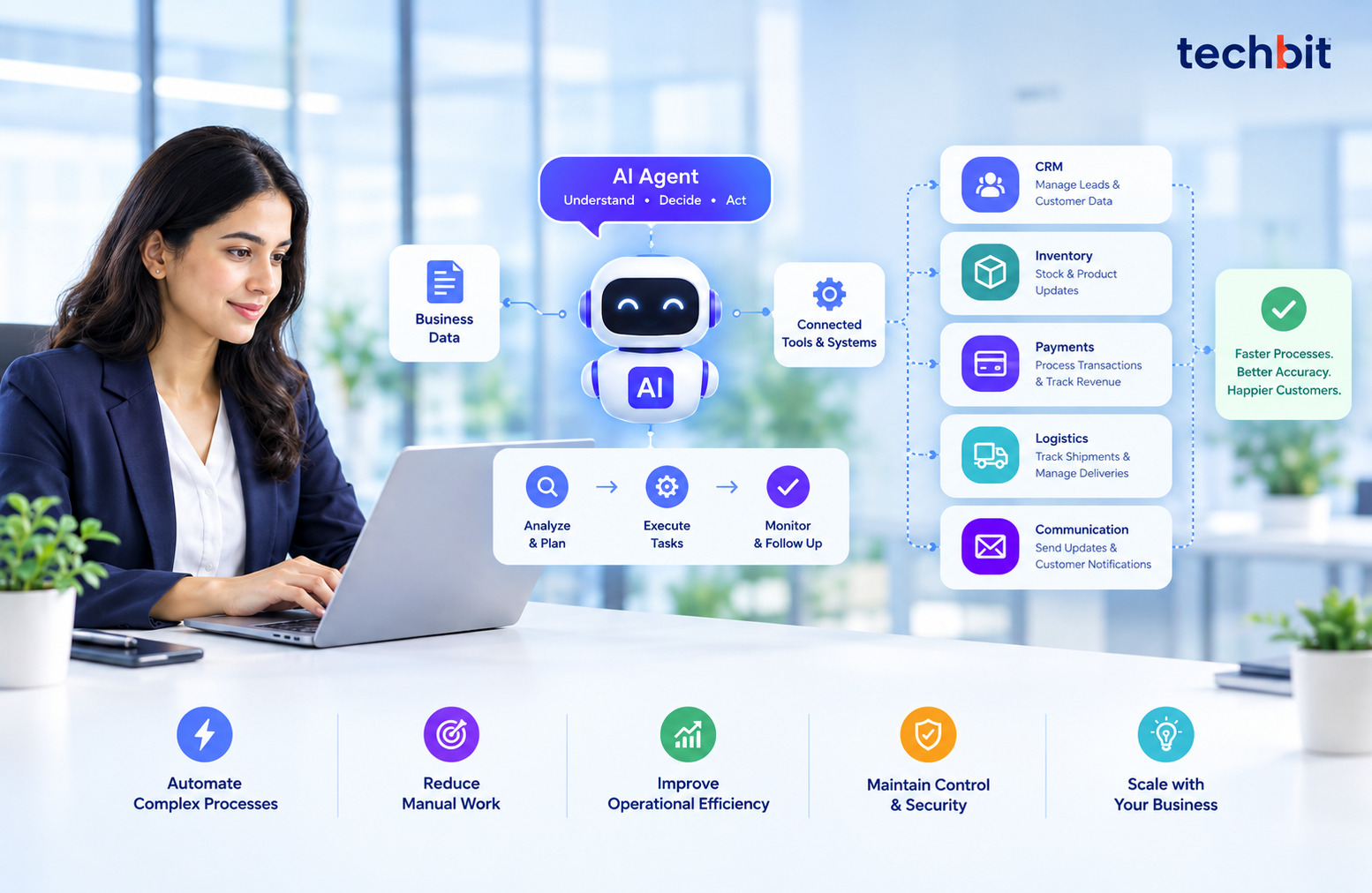
Running a business process takes more than finishing separate tasks. Information has to travel between systems. Decisions have to happen at the right time. Every step has to be handed off to the next. When people hold all that together by hand, even routine work gets harder as the company grows. AI agent workflow automation offers another way.
AI agents work with business data, use software tools, and coordinate tasks toward a specific goal. Organizations get a new way to handle complex processes, and they keep control of the decisions and outcomes that matter.
How AI Agents Connect Multiple Steps in a Business Process
Most business processes are a chain of linked activities. Processing an order, for example, can mean checking inventory, confirming payment, creating an invoice, arranging delivery, and telling the customer. Spread those steps over separate systems and employees end up moving information by hand and chasing different teams.
AI agents can help coordinate the chain. They pull the relevant information, use connected tools, and complete the actions they’re allowed to take. They can also spot missing details or flag a task that needs attention. AI agents can coordinate several related tasks toward one goal. Managing each task separately can take more time and effort.
The results are still dependent on the quality of the data, the systems the agent is connected to and the instructions it is following. Not every process needs an AI agent either. Simpler tasks may do better with traditional automation.
What Happens When an AI Agent Manages a Workflow?
Say a customer’s order is delayed. To fix it, someone looks up the order record, checks the delivery details, contacts the team in charge, and writes an update to the customer.
An AI agent could pull the available order details, work out what information the investigation needs, and notify the right team. When an update comes in, it could draft the customer’s reply. If it’s authorized, it could send it.
That cuts down repetitive follow-ups. Employees also reach the relevant information without checking several systems themselves. If the information is incomplete, or the case needs a decision beyond the agent’s permissions, the task goes to an employee.
The point isn’t to take people out of the process. Technology handles the suitable steps. Employees keep control of exceptions and important decisions.
AI Agents vs. Chatbots vs. Traditional Workflow Automation
These technologies do different jobs. They can still work together inside one business process.
| Technology | How It Works | Best Suited For |
| Traditional workflow automation | Follows predefined rules and triggers specific actions. | Repetitive tasks with predictable steps. |
| AI chatbots | Interact with users, answer questions, and collect information. | Customer support and conversational interactions. |
| AI agents | Use available context and connected tools to coordinate multiple actions. | Multi-step workflows involving different tasks or changing conditions. |
Businesses looking into AI chatbot development services should start by asking what they need.
Where AI Agents Can Improve Business Operations
AI agents for business automation can help departments that juggle many tasks, applications, and information sources.
- Sales & Marketing: Sort leads, extract necessary customer information, update CRM, and prepare tasks for salespeople.
- Customer Service: Extract information from the available records, provide suggestions for responses to frequently asked questions, and escalate complex cases.
- Finance & Administration: Extract invoice information, identify missing information, compare records, and send documents for approval.
- Business Operations: Manage task allocation, monitor progress, and inform staff if something has been delayed or requires additional information.
- Healthcare: Healthcare software development services can help healthcare providers connect their systems and manage patient information more easily. For specialized needs, AI Medical Software Development can support medical data analysis, routine task automation, and tools that help doctors make informed decisions.
These uses help most when employees spend a lot of time moving information between systems. Evaluate each workflow on its own. An AI agent might improve it. It might also add complexity you don’t need.
What Makes an AI-Driven Workflow Reliable?
AI automation needs boundaries to work reliably. Begin with accurate, accessible data. Make sure the connected applications supply what each task needs.
Access permissions matter just as much. An agent that prepares invoices, for example, shouldn’t automatically get permission to approve payments. Set rules as to which actions can be automated and which require approval by employees.
Another important aspect of the build is monitoring. Using activity logs, outputs, and escalation processes will help you identify issues within the process and troubleshoot any anomalies.
You can also test your workflow using a variety of inputs to determine if there are areas that need additional clarity or extra protection in place for the agent.
Developing AI Workflows Around Existing Business Systems
Understand your software, data, security needs, and process complexity. If you are looking for an AI solution, our AI software development service can help businesses to implement AI into their applications and processes.
Sometimes standard tools will not help to cover specific requirements, and a custom AI ML development company may be the best choice.
You can use wider software development services to create APIs, databases, and connections between applications.
At Techbit Solutions, we have AI/ML development expertise that includes chatbots, virtual assistants, and deploying models. It depends on your goal, tech stack, and what you need your processes to do.
Define the outcome you want before development starts. A clear scope makes it easier to choose suitable tools, set permissions, test the workflow, and decide whether the final solution meets its requirements.
How to Measure Workflow Automation Results
Judge automation by practical performance measures. How many tasks an agent completes isn’t enough.
Useful measures include:
- Completion time: Does the workflow finish faster than before?
- Error rate: How often do tasks need corrections?
- Manual intervention: How frequently must employees step in?
- Completion rate: How often does the workflow reach its intended result?
Compare these with the original process before you expand automation. A workflow that gets faster but makes more errors may need extra checks or changes.
Starting with one manageable process helps identify any limitations, improve its performance, and make better choices about where it would be best to deploy AI agents.
FAQs
1. What is AI agent workflow automation?
AI agent workflow automation uses AI agents to carry out several tasks with the aim of completing an outcome. AI agents can gather information, interact with integrated systems, take action, and raise cases depending on their permissions.
2. Can AI agents operate across various business software systems?
Yes. AI agents can work across multiple business applications when the required integrations, data access, and permissions are in place. The available features depend on the systems being connected.
3. Are AI agents applicable for small businesses?
Yes. Small businesses can use the technology for some tasks, such as processing orders. By focusing on one well-defined area, you can save money, and it also makes it easier to measure success.
4. Is an AI agent different from traditional automation?
Traditional automation is based on strictly defined processes. AI agents can analyze context and perform several functions simultaneously. Both technologies can complement each other since traditional automation does only repetitive jobs, while agents are used in different workflows.
5. Do AI agents always need human supervision?
It is always better to involve human control in cases when an important decision needs to be made, or the situation is uncertain. Establish restrictions, permission requirements, and monitoring systems according to possible risks.